

The AI Enhancer for Enscape, Corona, and V-Ray 7 for 3ds Max.
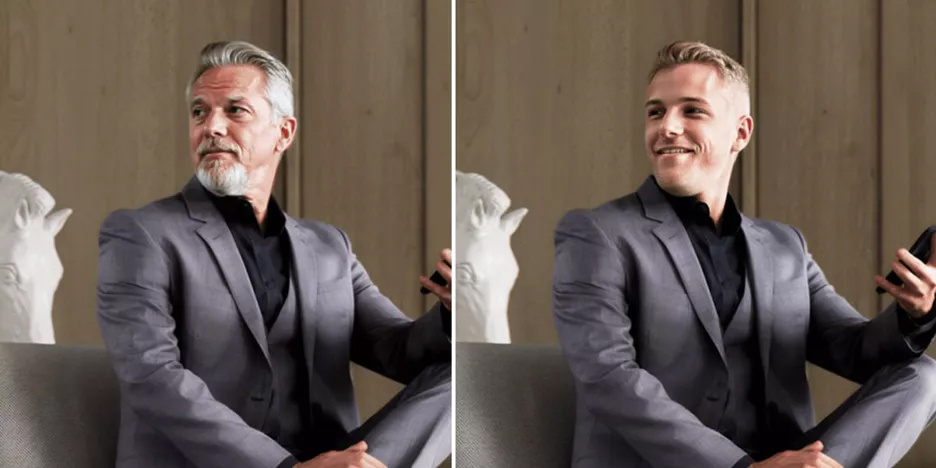
The latest update to the AI Enhancer introduces detailed control over how people and vegetation are treated in your images. Using object masks generated automatically by Enscape, V-Ray, Corona, and Envision, you can now make targeted adjustments with ease.
Simply upload your .exr file to Chaos Cloud Collaboration, open the editing tools, and fine-tune the results with the new advanced settings. These features are currently in beta, and your feedback directly influences how the tool evolves. You can share ideas through the official Ideas Portal or rate the enhancements right inside Chaos Cloud Collaboration.
With these expanded controls, you get more predictable, consistent results while significantly reducing the need for manual post-production.
From the beginning, the AI Enhancer was designed for quick improvements—one click and your image looked better. But some users found that the tool occasionally altered the appearance of people or greenery in unintended ways.
The new advanced controls solve that by giving you the ability to:
The AI Enhancer now understands visual elements more reliably, especially when identifying people, foliage, and other objects. Issues such as characters changing appearance between iterations or greenery being enhanced incorrectly have been greatly minimized, with more improvements on the way.
These upgrades deliver sharper imagery, better preservation of your original artistic intent, and more consistent results throughout your rendering workflow.
Your workflow remains the same—only your control improves. The advanced features are built right into the familiar steps:
Everything is fast, intuitive, and fully integrated into the tools you already use every day.
You’re no longer forced to choose between a full-scene improvement and selective adjustments. The AI Enhancer now lets you blend both in the same session.
This gives you the flexibility to enhance the overall mood and lighting of your scene while fine-tuning targeted elements—such as people or vegetation—to match your creative vision. It also sets the stage for future features that will offer even deeper control and customization within your renders.


